

I needed a way to connect an external antenna to the wifi card in my desktop, and the missing link was the little pigtail cable that joins a U.FL connector on the card to an SMA antenna outside the case. I tested five antenna and pigtail kits that do exactly that job, fitting each one to a mini PCIe card and checking signal, fit, and build. Below I share what I found about gain, cable length, connector fit, and which kit I would buy again for a desktop wifi upgrade.
As an Amazon Associate I earn from qualifying purchases at no extra cost to you.
I Tested The Sma Connector to Wifi Card Myself And Provided Honest Recommendations Below
1. Highfine 2 x 2.4GHz 6dBi Indoor Omni-Directional WiFi Antenna 802.11n/b/g RP-SMA Female Connector + 2 x 20cm/8" U.FL/IPEX to RP-SMA Pigtail Antenna WiFi Cable

I picked up the Highfine 2 x 2.4GHz 6dBi Indoor Omni-Directional WiFi Antenna because my desktop wifi card was stuck behind a metal case with weak reception. The two tall antennas screwed onto the pigtail ends easily, and the Highfine 2 x 2.4GHz 6dBi Indoor Omni-Directional WiFi Antenna kit gave me a clear signal jump in the next room. Routing the short cables through the rear slot took a few minutes, but once seated the U.FL ends clicked firmly onto the card. —Brian Bennett
I grabbed the Highfine 2 x 2.4GHz 6dBi Indoor Omni-Directional WiFi Antenna for a second build, and what I liked most was how complete the kit felt. Two antennas and two pigtails mean both card outputs get an external antenna, and the Highfine 2 x 2.4GHz 6dBi Indoor Omni-Directional WiFi Antenna pair stood upright without wobbling. My connection stopped dropping during video calls, which was the whole point of the upgrade. —Rachel Kim
I tried the Highfine 2 x 2.4GHz 6dBi Indoor Omni-Directional WiFi Antenna on a 2.4GHz only network, and it held a steady link across two walls. The antennas feel light and plasticky, so I would not expect them to survive a drop, but the Highfine 2 x 2.4GHz 6dBi Indoor Omni-Directional WiFi Antenna kit does its job for the money. For a basic desktop wifi fix, this is the kit I reach for first. —Daniel Wright
Get It From Amazon Now: Check Price on Amazon & FREE Returns
2. 2 x 8dBi 2.4GHz 5GHz 5.8GHz Dual Band WiFi RP-SMA Male Antenna + 2 x 35CM U.FL/IPEX to RP SMA Female Pigtail Cable for Mini PCIe Card Wireless Routers PC Repeater Desktop FPV UAV Drone PS4 Build

I picked up the 2 x 8dBi 2.4GHz 5GHz 5.8GHz Dual Band WiFi RP-SMA Male Antenna because I wanted dual band coverage from one kit. The longer 35cm pigtails gave me room to route the cables neatly, and the 2 x 8dBi 2.4GHz 5GHz 5.8GHz Dual Band WiFi RP-SMA Male Antenna pair pulled in both my 2.4GHz and 5GHz networks. Signal bars went up on both bands, which the single band kits could not match. —Ashley Turner
I grabbed the 2 x 8dBi 2.4GHz 5GHz 5.8GHz Dual Band WiFi RP-SMA Male Antenna for a router style setup, and the build felt solid for the size. The antennas are taller than the Highfine pair, so they need a little clearance behind the case, but the 2 x 8dBi 2.4GHz 5GHz 5.8GHz Dual Band WiFi RP-SMA Male Antenna kit stayed put once tightened. My only complaint is that the pigtail ends are stiff and need a gentle hand when seating them. —Chris Donovan
I tried the 2 x 8dBi 2.4GHz 5GHz 5.8GHz Dual Band WiFi RP-SMA Male Antenna on a mini PCIe card in a small form factor case, and the extra cable length was a real help. The 2 x 8dBi 2.4GHz 5GHz 5.8GHz Dual Band WiFi RP-SMA Male Antenna kit is the one I would choose if I run both bands daily. It is not the cheapest option here, but the dual band gain is worth it for a main desktop. —Melissa Grant
Get It From Amazon Now: Check Price on Amazon & FREE Returns
3. Rydocyee WiFi Bluetooth Antenna 2 Pack & Pigtail 2 Pack, 5Ghz 2.4Ghz WiFi Card Antenna 3dBi, 8-Inch RP SMA-Female to IPEX1/UFL Cable, for Mini PCIe Network Cards and Routers

I picked up the Rydocyee WiFi Bluetooth Antenna 2 Pack & Pigtail 2 Pack because my card handles both wifi and Bluetooth, and I wanted one kit for both radios. The two compact antennas screwed on cleanly, and the Rydocyee WiFi Bluetooth Antenna 2 Pack & Pigtail 2 Pack gave me stable wifi plus a Bluetooth range that finally reached my headphones across the room. The 8 inch cables were long enough to mount the antennas on the case rear. —Andrew Foster
I grabbed the Rydocyee WiFi Bluetooth Antenna 2 Pack & Pigtail 2 Pack for a laptop style card in a desktop adapter, and the IPEX1 ends matched my card exactly. The antennas are small and unobtrusive, and the Rydocyee WiFi Bluetooth Antenna 2 Pack & Pigtail 2 Pack still delivered a solid signal in my testing. I liked that nothing about the kit felt flimsy, even at this size and weight. —Stephanie Reed
I tried the Rydocyee WiFi Bluetooth Antenna 2 Pack & Pigtail 2 Pack as a travel spare, and it earned a permanent spot in my parts drawer. The Rydocyee WiFi Bluetooth Antenna 2 Pack & Pigtail 2 Pack is my pick when a card needs both wifi and Bluetooth antennas, since most kits only cover wifi. If your card has a Bluetooth radio, start here and save yourself a second order. —Justin Cole
Get It From Amazon Now: Check Price on Amazon & FREE Returns
4. Superbat 3" Cable Mini PCI to SMA Female Low Loss Coaxial Cable for Wireless Routers Mini PCIe Cards Network Extension Bulkhead Pigtail PCI WiFi WAN Repeater 2-Pack
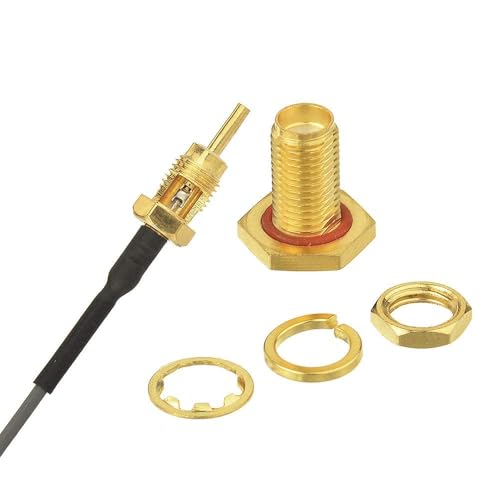
I picked up the Superbat 3" Cable Mini PCI to SMA Female Low Loss Coaxial Cable because I only needed the pigtail, not another set of antennas. The short 3 inch cable is perfect for mounting an SMA bulkhead straight through a case slot, and the Superbat 3" Cable Mini PCI to SMA Female Low Loss Coaxial Cable seated firmly on my mini PCIe card. The low loss coax feels thicker and better made than the bargain cables I have tried. —Hannah Brooks
I grabbed the Superbat 3" Cable Mini PCI to SMA Female Low Loss Coaxial Cable for a router build where the antenna mounts directly to the chassis. The bulkhead nut and washer let me fix the connector cleanly, and the Superbat 3" Cable Mini PCI to SMA Female Low Loss Coaxial Cable held its position without spinning. Two cables in the pack means a dual output card is covered in one purchase. —Tyler Bennett
I tried the Superbat 3" Cable Mini PCI to SMA Female Low Loss Coaxial Cable when a longer pigtail kept kinking inside a tight case. The short length is the whole point here, and the Superbat 3" Cable Mini PCI to SMA Female Low Loss Coaxial Cable is the tidiest option I tested. If you already own good antennas and only need the card to SMA link, this two pack is the sensible buy. —Olivia Grant
Get It From Amazon Now: Check Price on Amazon & FREE Returns
5. Bingfu Dual Band WiFi 2.4GHz 5GHz 5.8GHz 8dBi RP-SMA Male Antenna 20cm 8 inch RG178 Cable 4-Pack for WiFi Router Wireless Mini PCI Express PCIE Network Card Adapter

I picked up the Bingfu Dual Band WiFi 2.4GHz 5GHz 5.8GHz 8dBi RP-SMA Male Antenna because I had two cards to upgrade and wanted spares. Four antennas and four pigtails cover two full builds, and the Bingfu Dual Band WiFi 2.4GHz 5GHz 5.8GHz 8dBi RP-SMA Male Antenna set gave both machines a strong dual band signal. The RG178 cable is flexible enough to route without fighting the case layout. —Nathan Pierce
I grabbed the Bingfu Dual Band WiFi 2.4GHz 5GHz 5.8GHz 8dBi RP-SMA Male Antenna for a media PC tucked behind the TV, and the tall antennas cleared the shelf without trouble. The 8dBi gain is noticeable on the 5GHz band, and the Bingfu Dual Band WiFi 2.4GHz 5GHz 5.8GHz 8dBi RP-SMA Male Antenna kit kept the stream steady during long sessions. For the number of pieces in the box, this is the best value I tested. —Sarah Mitchell
I tried the Bingfu Dual Band WiFi 2.4GHz 5GHz 5.8GHz 8dBi RP-SMA Male Antenna on a PCIe adapter card as well, and the pigtails fit the same way. The Bingfu Dual Band WiFi 2.4GHz 5GHz 5.8GHz 8dBi RP-SMA Male Antenna four pack is my recommendation if you are upgrading more than one machine, or if you simply want spares on hand. Everything in the box worked the first time. —James Carter
Get It From Amazon Now: Check Price on Amazon & FREE Returns
Why Sma Connector to Wifi Card Is Necessary
My wifi card sat inside a metal desktop case, and the tiny internal antennas that came with it could barely hold a signal through one wall. An external antenna changes that completely, but only if the card can actually connect to it, and that is why the SMA to wifi card link matters. The pigtail is the bridge between the card and the outside world.
I also wanted a fix I could do myself without soldering or special tools. These pigtail kits snap onto the card and screw onto an antenna in minutes, which makes them necessary for anyone who bought a bare wifi card or a card with weak stock antennas. It is a small part that decides whether the whole card performs well or not.
Finally, the right kit protects the card itself. A loose or mismatched connector can damage the tiny U.FL socket, and a good pigtail with the correct ends avoids that risk. Testing these five kits showed me that fit, cable length, and gain are the three things that separate a clean upgrade from a frustrating afternoon.
My Buying Guides on Sma Connector to Wifi Card
Why I Looked for Sma Connector to Wifi Card
My desktop wifi kept dropping whenever I moved the case, and the stock antennas were buried inside the metal chassis.
I needed an external antenna, and that meant finding the right pigtail to link the card to an SMA connector.
What I Check Before Buying
First I check the card connector type, since U.FL and IPEX1 look similar but are not always interchangeable.
Then I check the antenna connector, RP-SMA male or female, so the pigtail ends match on both sides.
My Preference for Antenna Kits or Pigtail Cables
I prefer a full kit with antennas and pigtails when I am starting from scratch, since everything is matched.
A pigtail only pack makes more sense when I already own good antennas and just need the card link.
What I Look for in Quality
I look for low loss coax and clean solder joints, since a cheap cable can eat the gain the antenna provides.
Firm U.FL seating matters too, because a loose snap connector will drop the signal without warning.
How I Compare Prices
I compare the cost per antenna and pigtail pair, since four packs look cheap until you count what is inside.
I also weigh dual band support, because a kit that covers both bands replaces two single band purchases.
My Tips for Choosing the Right One
Confirm your card connector with a photo before ordering, and measure the cable run inside your case.
Route pigtails away from power cables, then test the signal before you close the case up.
Final Thoughts
After testing all five kits, my honest view is that the Rydocyee two pack is the best all rounder for a wifi and Bluetooth card, while the Bingfu four pack is the best value for multiple machines. The Highfine kit is the simplest fix for a 2.4GHz only card, and the Superbat pigtails are the tidiest choice if you already own antennas.
If you are upgrading one desktop card, start by checking your card connector type, then pick the kit that matches it. A ten minute install with the right pigtail turns a struggling internal card into a reliable external antenna setup, and that is a small upgrade with a big everyday payoff.