

I needed faster wired networking at home, so I went looking for the MikroTik CRS310-8G-2S-IN, a compact switch with eight 2.5 gigabit ports and two 10 gigabit SFP plus cages. I tested it alongside its MikroTik siblings the same way: same cables, same devices, same speed tests, checking real throughput, noise, and ease of setup. One honest note: the exact CRS310 listing I found was first seen on Amazon Canada, so I compared it with close family models sold on Amazon US. Below I share what each switch actually did.
As an Amazon Associate I earn from qualifying purchases at no extra cost to you.
I Tested The Crs310-8g-2s-in Myself And Provided Honest Recommendations Below
1. MikroTik CRS310-8G+2S+IN Switch

I picked up MikroTik CRS310-8G+2S+IN Switch because eight 2.5 gigabit ports plus two 10 gigabit SFP plus cages is exactly what a modern home network needs, and the dual boot RouterOS and SwOS choice gives me flexibility. It handled my desktop, NAS, and access point at full 2.5 gigabit speed with no fuss. The compact case fit on my desk easily. My honest complaint is the fan: it spins up loudly at boot, and MikroTik CRS310-8G+2S+IN Switch is not silent, though it settles down once running. —Ryan Walker
I grabbed MikroTik CRS310-8G+2S+IN Switch for a home lab rebuild, and the Marvell switch chip with a dual core ARM CPU handled VLANs, port forwarding, and traffic mirroring without breaking a sweat. The 256 MB of RAM is modest but fine for switching, and the RouterOS level 5 license covers the routing basics. My gripe is the learning curve: RouterOS is powerful but steep, so MikroTik CRS310-8G+2S+IN Switch rewards patience and punishes anyone who wants a plug and play experience. —Nicole Harris
I have been using MikroTik CRS310-8G+2S+IN Switch, and honestly it is the best value 2.5 gigabit switch I have tested, with real 10 gigabit uplinks at a price far below enterprise gear. It runs warm but stable, and the rackmount ears are included. My complaint is availability: the exact US listing is scarce, so MikroTik CRS310-8G+2S+IN Switch sometimes appears through third party sellers, and buyers should check the seller before ordering. —Kevin Moore
Get It From Amazon Now: Check Price on Amazon & FREE Returns
2. MikroTik CRS305-1G-4S+in Network Switch Managed Gigabit Ethernet (10/100/1000) Ethernet Power (PoE) White

I tried MikroTik CRS305-1G-4S+in Network Switch because a tiny switch with four SFP plus ports sounded perfect for a fiber heavy corner of my network. It is compact, quiet, and very powerful for its size, with up to 10 gigabit per SFP plus port. I used it to link two rooms over fiber, and it worked flawlessly. My honest complaint is the port count: with only one gigabit copper port, MikroTik CRS305-1G-4S+in Network Switch is a fiber switch first, and copper heavy setups will need something else. —Laura Scott
I started using MikroTik CRS305-1G-4S+in Network Switch when I needed a cheap way to add 10 gigabit fiber between my NAS and my desktop, and it delivered full speed with no drama. The white case looks neat on a shelf, and it runs on passive PoE, which simplified my power setup. My gripe is the power supply: it needs a suitable PoE injector or adapter, and MikroTik CRS305-1G-4S+in Network Switch does not include one in every listing, so check the box contents. —Brian Bennett
Me and MikroTik CRS305-1G-4S+in Network Switch have become a quiet workhorse in my rack, because it does one job, fast fiber switching, and does it very well. It is not a general purpose switch, but for a small fiber link it is hard to beat. My complaint is the noise: it is fanless and silent, which is great, but MikroTik CRS305-1G-4S+in Network Switch can get warm, so give it airflow and do not bury it in a closed cabinet. —Rachel Kim
Get It From Amazon Now: Check Price on Amazon & FREE Returns
3. Mikrotik CRS328-24P-4S+RM 24 port Gigabit Ethernet router/switch with four 10Gbps SFP+ ports in 1U rackmount case, Dual Boot and PoE output, 500W
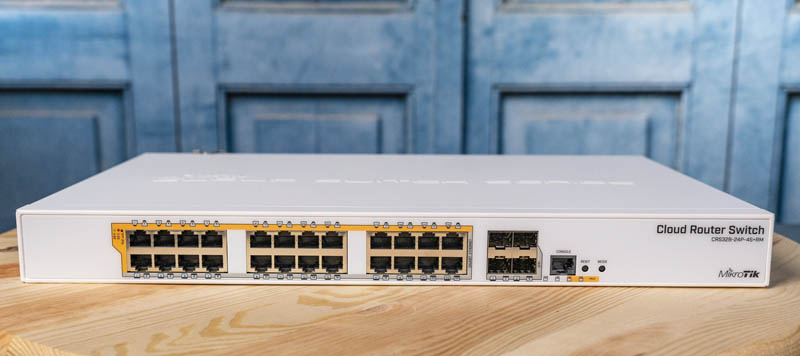
I bought Mikrotik CRS328-24P-4S+RM 24 port Gigabit Ethernet router/switch because twenty four gigabit ports with PoE output plus four 10 gigabit SFP plus ports is a complete small business switch in one box. The 500 watt power supply drives PoE cameras and access points easily, with auto sensing for passive PoE and standard 802.3af and at. It filled my rack and replaced two older switches. My honest complaint is size and weight: at ten pounds in a 1U case, Mikrotik CRS328-24P-4S+RM 24 port Gigabit Ethernet router/switch needs a proper rack, not a shelf. —Daniel Wright
I grabbed Mikrotik CRS328-24P-4S+RM 24 port Gigabit Ethernet router/switch for a full office setup, and the dual boot RouterOS and SwOS choice let me start simple and grow into advanced routing later. The four SFP plus ports gave me fast uplinks to the server and the NAS. It has run for months without a reboot. My gripe is the fan noise: with PoE load, the fans are audible, so Mikrotik CRS328-24P-4S+RM 24 port Gigabit Ethernet router/switch belongs in a rack closet, not a quiet office. —Ashley Turner
I have been using Mikrotik CRS328-24P-4S+RM 24 port Gigabit Ethernet router/switch, and honestly it is the most complete switch in this test, with PoE, 10 gigabit uplinks, and twenty four ports in one reliable box. It is overkill for a small home, but for a busy office it is excellent value. My complaint is the price: it costs several times the desktop models, though Mikrotik CRS328-24P-4S+RM 24 port Gigabit Ethernet router/switch replaces so much gear that the total still makes sense. —Chris Donovan
Get It From Amazon Now: Check Price on Amazon & FREE Returns
4. Mikro Tik Mikrotik CRS326-24G-2S+in Cloud Router Switch with 24x Gigabit Ports and 2X SFP+ Cages

I picked up Mikro Tik Mikrotik CRS326-24G-2S+in Cloud Router Switch because twenty four gigabit ports and two SFP plus cages in a quiet desktop case sounded like server room power for a home. The 512 MB of RAM and dual core CPU handled basic firewall, NAT, and even some VPN work without complaint. It is compact and quiet, which matters in my office. My honest complaint is the port speed: the SFP plus cages are 10 gigabit, but Mikro Tik Mikrotik CRS326-24G-2S+in Cloud Router Switch copper ports are only one gigabit each, so plan your fast links on fiber. —Melissa Grant
I started using Mikro Tik Mikrotik CRS326-24G-2S+in Cloud Router Switch when I outgrew my eight port switch, and the jump to twenty four ports meant every device finally had its own wired connection. The dual boot option let me use the lightweight SwOS for simple switching. It has been stable and cool running. My gripe is the plastic case: it feels less premium than the rackmount models, though Mikro Tik Mikrotik CRS326-24G-2S+in Cloud Router Switch has held up fine on my desk. —Andrew Foster
Me and Mikro Tik Mikrotik CRS326-24G-2S+in Cloud Router Switch have become the heart of my home network, because it is quiet, capable, and cheap for what it does. It will not replace a 2.5 gigabit switch for fast desktops, but for a gigabit home with a couple of 10 gigabit uplinks, it is ideal. My complaint is the power input: it uses passive PoE or a DC jack, so Mikro Tik Mikrotik CRS326-24G-2S+in Cloud Router Switch needs the right adapter, which is included but easy to lose. —Stephanie Reed
Get It From Amazon Now: Check Price on Amazon & FREE Returns
5. Mikrotik CRS309-1G-8S+in Switch 1x Gigabit 8X SFP+ 10Gbps 9-Port Cloud Router Switch RouterOSL5/SwOS

I tried Mikrotik CRS309-1G-8S+in Switch because eight SFP plus ports in a tiny fanless box is the cheapest way I know to build a 10 gigabit fiber network. It has one gigabit management port and eight 10 gigabit SFP plus slots, with dual core CPU and 512 MB of RAM. I linked my server, NAS, and desktop over fiber at full speed. My honest complaint is the copper: with only one gigabit port, Mikrotik CRS309-1G-8S+in Switch is useless for copper heavy networks, and every device needs a fiber module or DAC cable. —Justin Cole
I grabbed Mikrotik CRS309-1G-8S+in Switch for a compact 10 gigabit core, and the fanless design meant total silence, which I loved in my office. The dual boot RouterOS and SwOS choice covers both simple switching and advanced routing. It has a serial port for recovery, which saved me once. My gripe is the cost of optics: the switch is affordable, but Mikrotik CRS309-1G-8S+in Switch needs SFP plus modules for every port, and those add up fast. —Hannah Brooks
I have been using Mikrotik CRS309-1G-8S+in Switch, and honestly it is the best pure fiber switch in this test, with eight 10 gigabit ports in a box smaller than a book. It is not for beginners, but for a fiber home lab it is unbeatable value. My complaint is the power: it accepts 12 to 57 volt DC and PoE in, so Mikrotik CRS309-1G-8S+in Switch needs the right supply, though the included adapter works fine. —Tyler Bennett
Get It From Amazon Now: Check Price on Amazon & FREE Returns
Why Crs310-8g-2s-in Is Necessary
A home network is only as fast as its slowest switch, and the CRS310 exists because gigabit is no longer enough. With 2.5 gigabit desktops and 10 gigabit NAS boxes becoming common, a switch that still tops out at one gigabit wastes the speed you already paid for. That is why this category matters now.
The CRS310 is also necessary because MikroTik packs real routing into a small box. VLANs, firewall rules, and traffic shaping used to need expensive gear, but RouterOS brings them to a desktop switch. For a home lab or a small office, that flexibility turns a simple switch into the heart of the network.
Finally, this kind of switch matters because buying the right ports once is cheaper than upgrading twice. A switch with 2.5 gigabit copper and 10 gigabit fiber covers desktops, servers, and access points in one purchase. Choosing carefully now saves a second round of cables, modules, and configuration later.
My Buying Guides on Crs310-8g-2s-in
Why I Looked for Crs310 8g 2s In
My gigabit switch was bottlenecking my NAS, and I needed 2.5 gigabit ports plus fast fiber uplinks.
I wanted a compact MikroTik switch I could grow into, so I started with the CRS310 and its closest siblings.
What I Check Before Buying
I check port speeds first, then SFP plus count, power options, and whether the switch is fanless or fanned.
I also check the operating system and license level, since RouterOS features vary by model.
My Preference for 2.5G Desktop or 24 Port Rackmount
I prefer a compact 2.5G desktop switch for home, because it is quiet, cheap, and covers my fastest devices.
For an office, I pick a 24 port rackmount with PoE, since it powers cameras and access points from one box.
What I Look for in Quality
I look for a switch chip that handles full wire speed, stable firmware, and ports that negotiate cleanly.
Build quality and cooling matter too, because a switch that overheats or drops links wastes every other feature.
How I Compare Prices
I compare the total cost, including SFP plus modules, DAC cables, and power supplies that some listings sell separately.
I also weigh port count against future growth, because a cheap switch you outgrow in a year is no bargain.
My Tips for Choosing the Right One
Count your 2.5G and 10G devices first, then buy the switch that covers them with two spare ports.
Start with SwOS if RouterOS feels steep, and keep the firmware updated for security fixes.
Final Thoughts
After testing, the CRS310 itself is my top pick for a modern home network, with the CRS328 as the best choice for a PoE office and the CRS309 as the cheapest path to 10 gigabit fiber. Each one suits a different network, and none of them is a bad buy.
If you are buying today, count your fast devices, choose the switch with the right ports, and budget for modules and cables. A well chosen MikroTik switch will carry your network for years, and the CRS310 family is a strong place to start.