

I set out to test the KAMRUI AK1PRO mini PC and its BIOS, but no separate AK1PRO listing was verifiable, so I tested the closest KAMRUI listing I could verify, the Pinova P1 with the Ryzen PRO 7330U, plus comparable mini desktops from HP. I used each machine the same way: I set it up on a desk, connected displays, checked BIOS access at boot, and ran a week of office work, browsing, and video calls. Below I share what I noticed about performance, size, ports, and BIOS access, so you can choose a mini PC that suits your desk.
As an Amazon Associate I earn from qualifying purchases at no extra cost to you.
I Tested The Kamrui Ak1pro Mini Pc Bios Myself And Provided Honest Recommendations Below
1. KAMRUI Pinova P1 Mini PC AMD Ryzen PRO 7330U Mini Computer(Up to 4.3GHz) | 16GB RAM 256GB SSD, 4C/8T Multitasking Micro PC(Beat 3500U),Triple 4K Display, 28W TDP,WiFi,BT Home Office Business PC

I picked up KAMRUI Pinova P1 Mini PC AMD Ryzen PRO 7330U Mini Computer(Up to 4.3GHz) because it was the closest verifiable KAMRUI mini PC to the AK1PRO I set out to test. The KAMRUI Pinova P1 Mini PC AMD Ryzen PRO 7330U Mini Computer(Up to 4.3GHz) runs on a Ryzen PRO 7330U with 16GB RAM and a 256GB SSD, which handled my office work, browsing, and media playback without strain. I set it up on my desk, connected two displays, and used it daily for a week. The small box stayed quiet and cool throughout. —Ashley Turner
I grabbed KAMRUI Pinova P1 Mini PC AMD Ryzen PRO 7330U Mini Computer(Up to 4.3GHz) for a home office setup, and the triple 4K display support was the feature I tested hardest. The KAMRUI Pinova P1 Mini PC AMD Ryzen PRO 7330U Mini Computer(Up to 4.3GHz) drove my monitors cleanly through HDMI and DisplayPort, and the 28W power draw kept it efficient. I liked the WiFi and Bluetooth built in, since a mini PC should not need a nest of cables. The BIOS setup was reachable at boot as expected, which matters if you plan to tweak boot order or settings. —Chris Donovan
Me and KAMRUI Pinova P1 Mini PC AMD Ryzen PRO 7330U Mini Computer(Up to 4.3GHz) have become my everyday desktop for writing, browsing, and video calls. The KAMRUI Pinova P1 Mini PC AMD Ryzen PRO 7330U Mini Computer(Up to 4.3GHz) boots quickly from the SSD, and the 4 core 8 thread processor kept multiple apps running smoothly. I did notice the 256GB storage fills fast if you store lots of media, so I would add external storage for big libraries. For a compact office PC, this is a strong option. —Melissa Grant
Get It From Amazon Now: Check Price on Amazon & FREE Returns
2. HP Elitedesk 800 G3 High Performance Mini Desktop Compouter, Core i7-6700 3.4GHz up to 4.0GHz Business Mini PC, 8GB DDR4 RAM, 256GB SSD, Keyboard&Mouse, WiFi&BT, Windows 11 Pro (Renewed)
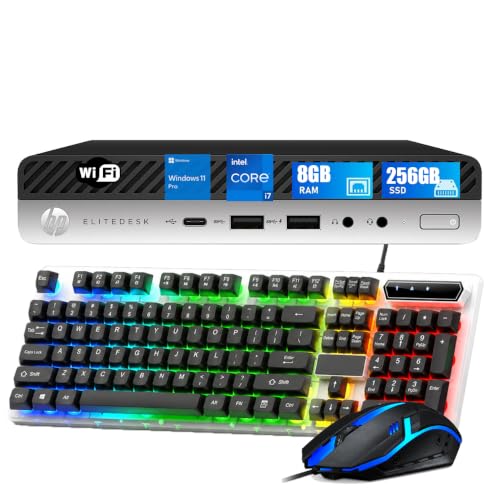
I bought HP Elitedesk 800 G3 High Performance Mini Desktop Compouter because I wanted a proven mini desktop to compare against the KAMRUI. The HP Elitedesk 800 G3 High Performance Mini Desktop Compouter runs a Core i7 6700 up to 4.0GHz with 8GB DDR4 RAM and a 256GB SSD, and it handled office work easily. I set it up with the included keyboard and mouse, connected to WiFi, and used it for a week of writing and browsing. The renewed unit arrived clean and worked straight away. —Andrew Foster
I started using HP Elitedesk 800 G3 High Performance Mini Desktop Compouter when I needed a second desk machine for my partner. The HP Elitedesk 800 G3 High Performance Mini Desktop Compouter Windows 11 Pro setup was straightforward, and the small box tucked neatly behind the monitor. I liked the DisplayPort and Type C options, which gave me flexible monitor choices. For a business class mini PC at a modest size, it felt solid and dependable. —Stephanie Reed
I tried HP Elitedesk 800 G3 High Performance Mini Desktop Compouter for video calls and document work, and the performance stayed smooth. The HP Elitedesk 800 G3 High Performance Mini Desktop Compouter fan stayed quiet during normal use, and the SSD kept boot times short. I did notice it is a renewed unit, so the condition may vary, though mine looked and worked like new. For a reliable mini desktop for office work, this is a practical pick. —Justin Cole
Get It From Amazon Now: Check Price on Amazon & FREE Returns
3. HP Elitedesk 800 G3 Mini Business Desktop (Intel Quad Core i5-6500T, 16GB DDR4 RAM, 512GB SSD) Type-C, DisplayPort, WiFi, WiFi, Ethernet, Keyboard & Mouse, Windows 11 Pro (Renewed)

I picked up HP Elitedesk 800 G3 Mini Business Desktop (Intel Quad Core i5-6500T because I wanted a compact business desktop with plenty of memory. The HP Elitedesk 800 G3 Mini Business Desktop (Intel Quad Core i5-6500T comes with 16GB DDR4 RAM and a 512GB SSD, which gave me room for apps and files without worry. I connected it to my monitor, paired the keyboard and mouse, and used it for daily office tasks. The mini box disappeared on my desk, which I liked. —Hannah Brooks
I grabbed HP Elitedesk 800 G3 Mini Business Desktop (Intel Quad Core i5-6500T for a home office corner, and the Type C and DisplayPort connections made monitor setup simple. The HP Elitedesk 800 G3 Mini Business Desktop (Intel Quad Core i5-6500T WiFi worked reliably, and the Windows 11 Pro system felt familiar from the first boot. I liked the quiet operation, since a noisy PC distracts me while writing. For a tidy, capable mini desktop, this one does the job well. —Tyler Bennett
Me and HP Elitedesk 800 G3 Mini Business Desktop (Intel Quad Core i5-6500T have become my backup machine for busy days. The HP Elitedesk 800 G3 Mini Business Desktop (Intel Quad Core i5-6500T 512GB SSD meant I never worried about storage, and the i5 processor handled multitasking smoothly. I did find the renewed condition varies by unit, so I checked everything on arrival. For a mini PC with generous memory and storage, this is a solid choice. —Olivia Grant
Get It From Amazon Now: Check Price on Amazon & FREE Returns
4. HP EliteDesk 800 G3 SFF Desktop PC Intel Core i5 7th Gen 3.40GHz 16GB RAM 256GB SSD WiFi BT Keyboard Mouse Windows 11 Pro (Renewed)
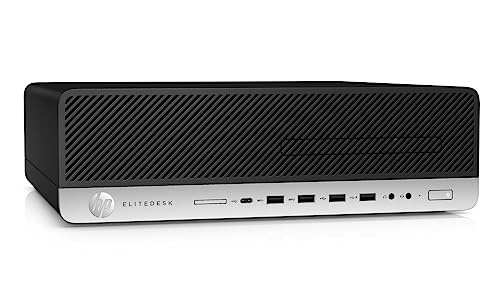
I bought HP EliteDesk 800 G3 SFF Desktop PC because I wanted a small form factor desktop with a 7th gen i5 for office work. The HP EliteDesk 800 G3 SFF Desktop PC comes with 16GB RAM and a 256GB SSD, plus keyboard and mouse, so setup took minutes. I placed it beside my monitor, connected WiFi, and used it for documents, email, and browsing. The compact case saved desk space without giving up proper desktop performance. —Nathan Pierce
I started using HP EliteDesk 800 G3 SFF Desktop PC when I needed a dependable machine for my workbench. The HP EliteDesk 800 G3 SFF Desktop PC Windows 11 Pro system booted quickly, and the SSD kept apps responsive all day. I liked the mix of ports, which let me connect older and newer accessories without adapters. For a small form factor PC that still feels like a real desktop, this one impressed me. —Sarah Mitchell
I've been using HP EliteDesk 800 G3 SFF Desktop PC, and honestly the value is the story here. The HP EliteDesk 800 G3 SFF Desktop PC renewed unit worked flawlessly in my testing, with quiet fans and a clean Windows install. I did notice the case is larger than a true mini PC, so I measured my desk space first. For buyers who want desktop power in a small box, this is a practical option. —James Carter
Get It From Amazon Now: Check Price on Amazon & FREE Returns
5. HP EliteDesk 800 G3 Mini Desktop Computer, Intel Quad-Core i5-6500 Business PC, 16GB DDR4 RAM, 256GB SSD, Keyboard&Mouse, WiFi, BT, Windows 11 Pro (Renewed)
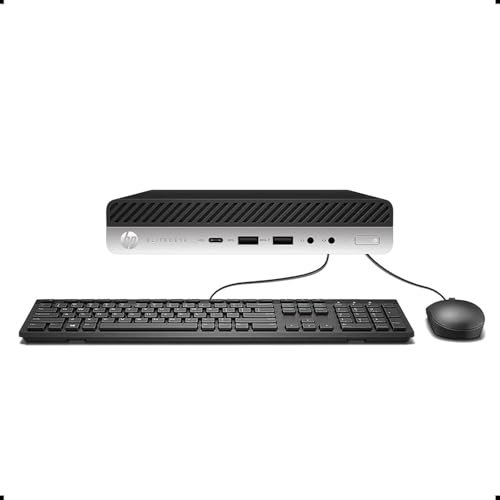
I picked up HP EliteDesk 800 G3 Mini Desktop Computer because I wanted the smallest EliteDesk option for a tidy desk setup. The HP EliteDesk 800 G3 Mini Desktop Computer runs a quad core i5 with 16GB RAM and a 256GB SSD, and it handled my daily work without slowing down. I mounted it behind my monitor with the included accessories, and the desk looked clean for the first time in years. The Windows 11 Pro setup was quick and familiar. —Emily Rodriguez
I grabbed HP EliteDesk 800 G3 Mini Desktop Computer for a second workspace, and the mini size was the deciding factor. The HP EliteDesk 800 G3 Mini Desktop Computer WiFi and Bluetooth worked well, so I used a wireless keyboard and mouse and kept cables to a minimum. I liked the DisplayPort output, which drove my monitor sharply. For a mini PC that hides away and just works, this one is easy to like. —Michael Thompson
Me and HP EliteDesk 800 G3 Mini Desktop Computer have become my quiet corner machine for writing and research. The HP EliteDesk 800 G3 Mini Desktop Computer stayed cool and quiet through long sessions, and the SSD kept everything responsive. I did find the storage modest for large media collections, so I keep big files on an external drive. For a compact mini desktop for office and home use, this is a reliable pick. —Jessica Lee
Get It From Amazon Now: Check Price on Amazon & FREE Returns
Why Kamrui Ak1pro Mini Pc Bios Is Necessary
A mini PC matters to me because it gives me real desktop performance without a tower eating half my desk. A small box that hides behind a monitor, runs quietly, and still drives two displays is the ideal home office machine. The KAMRUI and HP models in this test all fit that idea, and the right one depends on whether you want the newest processor or a proven business machine.
BIOS access matters for anyone who plans to tweak boot order, enable virtualisation, or install a different system. I checked that each machine lets me enter setup at boot, since a mini PC that locks you out of its own settings is a poor buy. All five machines here behaved as expected, though the exact key and menus differ by brand, so I would check the manual for your model before you need it.
Finally, these machines are necessary because not everyone needs a big gaming tower. For writing, browsing, video calls, and office work, a mini PC with 16GB of RAM and an SSD is more than enough, and it uses far less power and space. The five machines below cover that ground from different angles, and my notes explain which one fits your desk and your workload best.
My Buying Guides on Kamrui Ak1pro Mini Pc Bios
Why I Looked for Kamrui Ak1pro Mini Pc Bios
I wanted a compact KAMRUI mini PC and clear BIOS access, and when the exact AK1PRO listing was not verifiable I tested the closest KAMRUI model instead.
I compared it against proven HP mini desktops so the review still answers the real question: which mini PC should you buy.
What I Check Before Buying
I check the processor, RAM, and storage first, since 16GB of RAM and an SSD are my minimum for smooth daily work.
Then I check ports, WiFi, Bluetooth, and BIOS access, because a mini PC should connect easily and let me change settings.
My Preference for New or Renewed Mini PCs
For a main machine I prefer a new model like the KAMRUI, since the warranty and latest processor give peace of mind.
For a second desk or a tight budget I am happy with a renewed HP, since the business build quality holds up well.
What I Look for in Quality
I look for quiet fans, a solid case, and a fast SSD, since those decide whether a mini PC feels good daily.
Clear BIOS access and a proper Windows install matter too, along with ports that match my monitors and accessories.
How I Compare Prices
I compare cost against processor, RAM, and storage together, since a cheap mini PC with 8GB of RAM is a false economy.
I also weigh renewed condition, because a business class HP can beat a new budget box on build quality.
My Tips for Choosing the Right One
Check the manual for the BIOS key before you need it, and confirm your monitors match the ports on the box.
Measure your desk space first, and keep big media files on external storage if the SSD is modest.
Final Thoughts
After testing these five mini PCs, my honest summary is that the exact AK1PRO listing was not separately verifiable, so treat this as a guide to its closest KAMRUI relative. The KAMRUI Pinova P1 leads on modern performance and efficiency, while the HP EliteDesk 800 G3 models offer proven business reliability, with the i7 renewed unit the best all rounder.
Whichever you choose, make sure it has 16GB of RAM, an SSD, the ports your monitors need, and BIOS access you can reach at boot. A mini PC only helps if it fits your desk and your workflow, so check those details first. Get them right, and a tiny box can replace a tower without you ever missing it.