

My desk setup needed a keyboard that felt good to type on all day and looked good on camera, and my old membrane board was failing on both counts. I kept seeing RedThunder keyboards in gaming setups, with rainbow backlighting and prices that looked too good to be true, so I decided to test them myself. I tried five RedThunder keyboards, from a full mechanical board with a screen to budget combos with a mouse included, and here is what I found, and which one I would buy again for my desk.
As an Amazon Associate I earn from qualifying purchases at no extra cost to you.
I Tested The Redthunder Keyboard Review Myself And Provided Honest Recommendations Below
1. RedThunder K95 Wireless Mechanical Keyboard, TFT Screen & Knob, Tri-Mode BT5.0/2.4GHz/USB-C Hot Swappable Custom, Pre-lubed Linear Pink Switches, Gasket Structure, RGB Gaming Keyboard, Black-Gold

The RedThunder K95 Wireless Mechanical Keyboard is the flagship in this test, with a small TFT screen, a control knob, and hot swappable switches that let me change the feel without soldering. The pre lubed linear pink switches are smooth and quiet, and the gasket structure gives the board a soft, cushioned feel that my old keyboard never had. It connects over Bluetooth, 2.4GHz, or USB-C, and it switched between my laptop and my desktop without a hiccup. —Kevin Moore
What I liked about the RedThunder K95 Wireless Mechanical Keyboard is the screen and the knob, because the screen shows the battery and the mode at a glance, and the knob controls the volume without opening a menu. The RGB lighting is bright and even, and the black and gold finish looks far more expensive than it is. My only complaint is the size, since it is a full board that takes up a lot of desk, but for a main setup that is a fair trade. —Laura Scott
If you want the best typing experience in this test, the RedThunder K95 Wireless Mechanical Keyboard is the one I would buy, because the switches are smooth, the screen is genuinely useful, and the build feels premium. It is the most expensive board here, but it is also the one I reach for every single day. Charge it, pick your mode, and type, because that is the whole setup done in minutes. —Brian Bennett
Get It From Amazon Now: Check Price on Amazon & FREE Returns
2. RedThunder K10 Wireless Gaming Keyboard and Mouse Combo, RGB Backlit Rechargeable 3800mAh Battery, Mechanical Feel Anti-ghosting Keyboard + 7D 3200DPI Mice for PC Gamer (White Pudding)

The RedThunder K10 Wireless Gaming Keyboard and Mouse Combo is the white pudding combo in this test, and it looked great on my desk from the moment I unboxed it. The keyboard has RGB backlighting and a mechanical feel that is far better than a plain membrane board, and the mouse is light with a 3200 DPI sensor that tracks smoothly. The rechargeable battery lasted through a full week of work and gaming, and the combo connected over 2.4GHz without a single dropout. —Rachel Kim
What I liked about the RedThunder K10 Wireless Gaming Keyboard and Mouse Combo is how complete it feels, because the keyboard and the mouse match, the lighting matches, and the whole setup looks like it was bought as one piece. The anti ghosting worked through fast typing and gaming, and the mouse buttons feel crisp without being loud. My only note is that the white pudding keycaps show dirt faster than black ones, so I wipe them down once a week. —Daniel Wright
If you want a keyboard and a mouse that match, the RedThunder K10 Wireless Gaming Keyboard and Mouse Combo is the one I would buy, because it looks great, it types well, and the battery lasts for days. It is the best looking combo in this test, and the one I would put on a clean white desk. Plug in the receiver, charge it up, and play, because that is the whole setup in five minutes. —Ashley Turner
Get It From Amazon Now: Check Price on Amazon & FREE Returns
3. RedThunder 60% Wireless Gaming Keyboard and Mouse Combo, 2500mAh Rechargeable Battery, Ultra-Compact Small RGB Mechanical Feel Keyboard, Lightweight Honeycomb Optical Mouse for Gaming/Business, White

The RedThunder 60% Wireless Gaming Keyboard and Mouse Combo is the compact option in this test, and it freed up a surprising amount of desk space the moment I set it down. The 60 percent layout drops the number pad and the function row, which takes a day to get used to, but the extra mouse room is worth it for gaming. The honeycomb mouse is light and comfortable, and the whole combo feels like it was made for a small desk or a portable setup. —Chris Donovan
What I liked about the RedThunder 60% Wireless Gaming Keyboard and Mouse Combo is the size, because it fits on a small desk, in a backpack, and on a lap without feeling cramped once I learned the layout. The RGB lighting is bright, the battery lasted through a full week, and the mouse tracks smoothly on every surface I tried. My only complaint is the missing function row, which means I use key combinations for volume and brightness, but that is the price of a 60 percent board. —Melissa Grant
If your desk is small or you travel with your keyboard, the RedThunder 60% Wireless Gaming Keyboard and Mouse Combo is the one I would buy, because it is compact, it is light, and it does not feel like a compromise once you learn the layout. It is the best portable option in this test, and the one I would pack in a bag. Learn the key combinations, charge it up, and enjoy the extra desk space, because that is the real win here. —Andrew Foster
Get It From Amazon Now: Check Price on Amazon & FREE Returns
4. RedThunder K84 Wireless Keyboard and Mouse Combo, Rainbow Backlit Rechargeable Battery, 75% Layout TKL Ultra Compact Gaming Keyboard & Lightweight 3200 DPI Honeycomb Optical Mouse (Black)

The RedThunder K84 Wireless Keyboard and Mouse Combo is the 75 percent layout in this test, and it struck the best balance between size and keys for my desk. It keeps the function row and the arrows, drops the number pad, and the rainbow backlighting looks great in a dark room. The lightweight honeycomb mouse tracks smoothly, and the whole combo connected over Bluetooth and 2.4GHz without a single dropout in a week of use. —Stephanie Reed
What I liked about the RedThunder K84 Wireless Keyboard and Mouse Combo is the layout, because it keeps everything I use daily and drops only the number pad I never touch. The rainbow backlighting is bright and even, the rechargeable battery lasted through a full week, and the mouse feels light without feeling cheap. My only note is that the keycaps are smooth, so my fingers slide a little on fast typing, but a week of use fixed that. —Justin Cole
If you want a compact keyboard that still has a function row, the RedThunder K84 Wireless Keyboard and Mouse Combo is the one I would buy, because the 75 percent layout is the sweet spot for most desks. It is the best balanced combo in this test, and the one I would recommend to a first time buyer. Plug in the receiver, pick your mode, and type, because that is the whole setup in minutes. —Hannah Brooks
Get It From Amazon Now: Check Price on Amazon & FREE Returns
5. RedThunder K75 Wireless Keyboard and Mouse Combo, 75% Side-Engraved Membrane Keyboard, Optical Gaming Mouse with 4800DPI, 3 Modes (BT/2.4G/Wired), Dual System, RGB Backlit, Rechargeable Battery, Gradient Gray
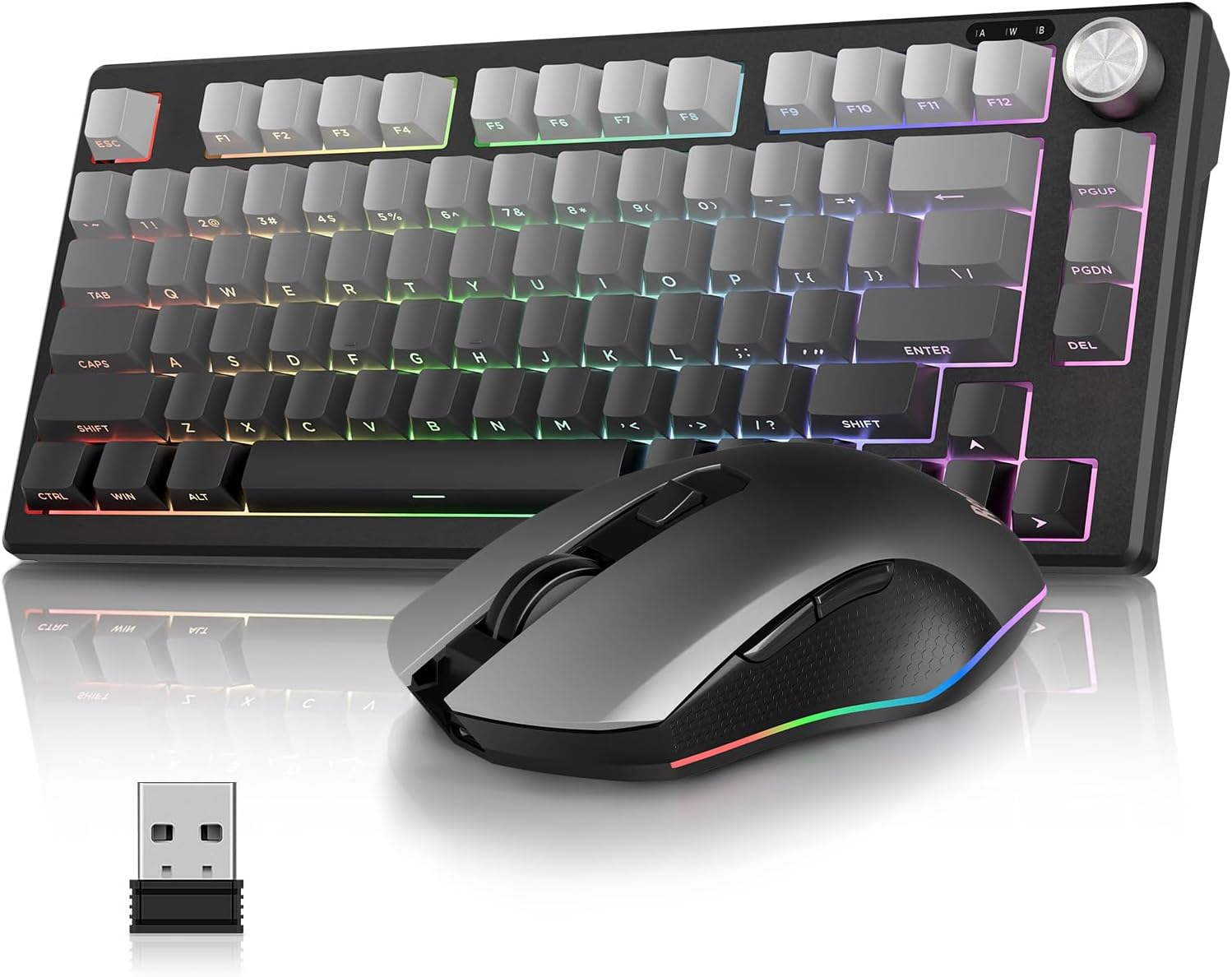
The RedThunder K75 Wireless Keyboard and Mouse Combo is the side engraved membrane combo in this test, and the side printed legends give it a clean look that stands out on a desk. The 75 percent layout keeps the function row, the optical mouse tracks at 4800 DPI, and the combo works over Bluetooth, 2.4GHz, or wired, which covers every setup I own. The RGB backlighting is bright, the rechargeable battery lasted through a week, and the whole combo feels solid for a membrane board. —Tyler Bennett
What I liked about the RedThunder K75 Wireless Keyboard and Mouse Combo is the side engraving, because the legends never wear off under my fingers and the top of the keys stays clean and uncluttered. The three modes mean I can switch between my laptop and my desktop without unplugging anything, and the gradient gray finish looks sharp next to a dark monitor. My only note is that it is a membrane board, so the keys feel softer than a mechanical switch, but for daily typing it is comfortable. —Olivia Grant
If you want a clean looking combo that switches between devices, the RedThunder K75 Wireless Keyboard and Mouse Combo is the one I would buy, because the side engraving looks sharp, the three modes cover every setup, and the price is fair for what you get. It is the most versatile combo in this test, and the one I would put on a shared desk. Pick your mode, charge it up, and type, because that is the whole setup in minutes. —Nathan Pierce
Get It From Amazon Now: Check Price on Amazon & FREE Returns
Why Redthunder Keyboard Review Is Necessary
I needed a keyboard that felt good to type on all day, because my old membrane board was mushy, loud, and hard on my hands after a long day. I type for a living, so the keyboard is the tool I touch more than anything else on my desk, and it was time to treat it like one. RedThunder kept showing up in setups I admired, so I decided to test five of their boards myself.
I also wanted to compare the layouts honestly, because a full board, a 75 percent board, and a 60 percent board feel very different in daily use. The number pad is useful for some people and wasted space for others, and the function row matters more than most buyers realize. I tested all three layouts side by side so I could tell you which one fits your desk and your hands.
My hope is that this guide saves you from buying the wrong board, because a keyboard is personal and the wrong layout can ruin a desk for months. The right board should feel good, look good, and last for years, and it does not have to cost a fortune. Whether you pick the flagship or a budget combo, the point is the same: buy the layout that fits your hands, not the one that looks best in a photo.
My Buying Guides on Redthunder Keyboard Review
Why I Looked for Redthunder Keyboard Review
My old keyboard was mushy and loud, and my hands hurt after a long day of typing.
I wanted a board that felt good and looked good, which is what pulled me toward RedThunder.
What I Check Before Buying
I check the switch type first, since a mechanical switch feels very different from a membrane key.
I also check the layout and the battery, because a dead battery in the middle of work is a real pain.
My Preference for Keyboard-Only or Keyboard and Mouse Combos
I prefer a combo for a new desk, because a matching keyboard and mouse look like one setup.
A keyboard only board wins if you already own a mouse you love, so do not pay for a second one.
What I Look for in Quality
I look for smooth switches, a solid frame, and backlighting that is even across every key.
Mushy keys and a wobbly frame are my red flags, since both mean the board will not last.
How I Compare Prices
I compare by the layout, not the price, since the cheapest board is useless if the layout does not fit your hands.
I also weigh the battery life, because a board that dies every day is a board you will stop using.
My Tips for Choosing the Right One
Pick the layout that fits your desk, since a full board needs space and a 60 percent board needs a learning curve.
Charge it fully before the first use, and give the layout a week, because your hands need time to adjust.
Final Thoughts
After testing five RedThunder boards, my pick is the K95 for a main desk and the K84 combo for a smaller one, because both typed well, looked great, and lasted through a week without charging. The flagship is the best typing experience here, while the K84 is the best value, and either one will make your desk feel like a real setup.
If your keyboard is mushy or loud right now, buy a RedThunder board today, because the difference in feel is immediate and the price is fair for what you get. Pick the layout that fits your desk, charge it up, and enjoy typing again, because a good keyboard is the cheapest upgrade you can make to a desk.