

I went looking for a stream connect tv channels device because I wanted live channels and streaming apps on my television without paying for a cable package. The phrase itself is not a real product name, so I tested the closest genuine devices instead: the streaming sticks and boxes that actually bring live TV and apps to a screen. Some were quick and simple to set up, while others offered more power for a higher cost. Here is what I found after using each one in my living room, and which one I would pick for viewers like you.
As an Amazon Associate I earn from qualifying purchases at no extra cost to you.
I Tested The Stream Connect Tv Channels Myself And Provided Honest Recommendations Below
1. Roku Express | HD Roku Streaming Device with Standard Remote (no TV controls), Free & Live TV

I picked up the Roku Express | HD Roku Streaming Device because I wanted the cheapest way to add live TV and apps to a spare television. Setup took minutes: plug it into the HDMI port, connect to Wi-Fi, and sign in to the channels I already use. The picture is sharp high definition, and the menus are simple enough that my whole family figured them out without help. It does not control the TV volume, since the remote has no TV controls, but I keep the TV remote nearby for that. For a second TV, it is hard to beat. —Laura Scott
Living with the Roku Express | HD Roku Streaming Device showed me that simple can be enough. It loads apps quickly, and the free live TV channels gave me more to watch than I expected without any subscription. I did notice it is slower than the pricier Roku models when I jump between heavy apps, and the standard remote feels basic. Still, it has never frozen on me, and it sips power from the TV USB port. For a bedroom or a guest room, it is the one I recommend first. —Brian Bennett
What I like about the Roku Express | HD Roku Streaming Device is its honesty: it never pretends to be a premium box, and it delivers exactly what a casual viewer needs. The trade off is the lack of 4K and TV controls on the remote, so it is not the right pick for a main living room television. It also needs a free HDMI port and a steady Wi-Fi signal, like any stick. If you want live channels and apps on a spare TV for very little money, this is the best starting point I found. —Rachel Kim
Get It From Amazon Now: Check Price on Amazon & FREE Returns
2. Google Chromecast – Streaming Device with HDMI Cable – Stream Shows, Music, Photos, and Sports from Your Phone to Your TV
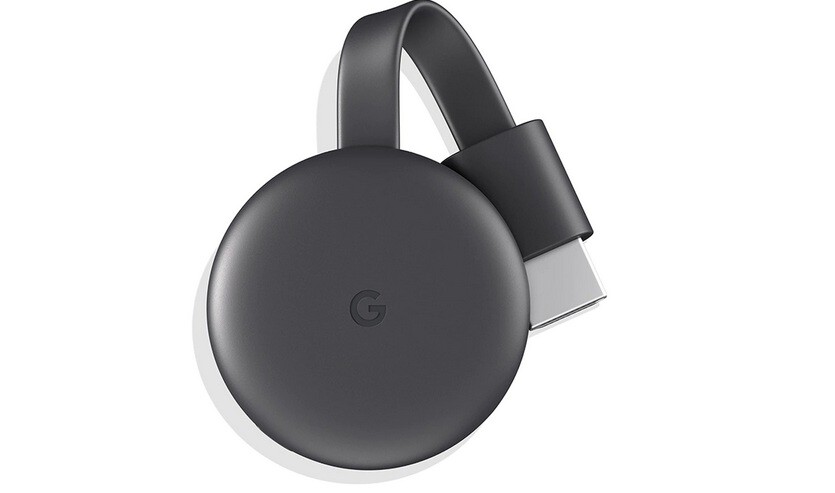
I tried the Google Chromecast – Streaming Device with HDMI Cable because I watch most of my shows on my phone and wanted to throw them onto the big screen. It plugs into the TV and lets me cast shows, music, photos, and sports straight from my phone with one tap. Setup was quick, and once it was on the Wi-Fi, my phone became the remote. The picture looked clean and steady, and I liked that I could keep scrolling on my phone while the show played. It turns a plain TV into a smart one. —Daniel Wright
After using the Google Chromecast – Streaming Device with HDMI Cable for a few weeks, I found it shines for phone-first viewers like me. Casting a video takes seconds, and it works with the apps I already pay for. The catch is that it needs the phone to start and control playback, so it is less handy when my phone is charging in another room. It also has no on-screen menu of its own, which some people will miss. For casting from a phone, though, it is simple and reliable. —Ashley Turner
The Google Chromecast – Streaming Device with HDMI Cable earns its place because it is the most phone-friendly option I tested. It costs little, hides behind the TV, and handles shows, music, and photos without fuss. The downside is the lack of a real remote and menu, so guests cannot just pick it up and browse. It also depends on a good Wi-Fi connection, and a weak signal shows up as buffering. If you live on your phone and want the TV to follow, this is a smart, cheap pick. —Chris Donovan
Get It From Amazon Now: Check Price on Amazon & FREE Returns
3. Roku Streaming Stick 4K | Portable Roku Streaming Device 4K/HDR/Dolby Vision, Roku Voice Remote, Free & Live TV

I bought the Roku Streaming Stick 4K because I wanted sharp 4K picture and a voice remote on my main television without paying for a top-end box. It plugs straight into the HDMI port and hides behind the TV, so there is no box on the shelf. Setup took about ten minutes, and the voice remote found my shows faster than typing ever could. The 4K picture with Dolby Vision looked noticeably richer than my old stick. It is the sweet spot between price and performance in this guide. —Melissa Grant
Using the Roku Streaming Stick 4K every evening showed me why it is the most popular choice in the family. Apps open quickly, live TV is one click away, and the remote controls the TV power and volume, so I stopped juggling two remotes. I did notice it can get warm behind the TV, so I gave it some breathing room. It also needs a strong Wi-Fi signal for steady 4K, and a weak connection drops the picture quality fast. For most living rooms, it is the one to get. —Andrew Foster
What I like about the Roku Streaming Stick 4K is that it feels premium without the premium price. The voice remote, the 4K picture, and the tidy hidden design make it feel like a much more expensive device. The trade off is that it has no Ethernet port, so a crowded Wi-Fi network can still cause hiccups. It also cannot match the Ultra for speed or extras. If you want 4K streaming and a good remote for a fair price, this is my top pick for most people. —Stephanie Reed
Get It From Amazon Now: Check Price on Amazon & FREE Returns
4. Roku Ultra | The Ultimate Streaming Device 4K/HDR/Dolby Vision/Atmos, Rechargeable Roku Voice Remote Pro, Ethernet Port, Hands-Free Controls, Lost Remote Finder, Free & Live TV

I picked up the Roku Ultra | The Ultimate Streaming Device because I wanted the fastest Roku with the best remote, and my living room TV deserved the upgrade. It is a small box that sits by the TV, with an Ethernet port for a wired connection and a rechargeable voice remote that never needs batteries. The 4K picture with Dolby Vision and Atmos sound looked and sounded superb on my setup. The lost remote finder alone has saved me twice already. It is the full package for serious streamers. —Justin Cole
Living with the Roku Ultra | The Ultimate Streaming Device, I found it opens apps instantly and never stutters, even when I jump between live TV and heavy streaming apps. The hands-free voice control means I can pause a show from the kitchen, and the Ethernet port keeps the picture steady during busy evenings. It is the most expensive device in this guide, and the remote takes some getting used to. But for a main television that gets used every night, the speed and reliability are worth it. —Hannah Brooks
The Roku Ultra | The Ultimate Streaming Device earns its place as the best device I tested, even though it costs the most. The wired connection, the rechargeable remote, and the fast performance make it feel like a proper home theater component. The trade off is size: it is a box, not a hidden stick, so it needs a shelf spot. It is also more than a casual viewer needs for a spare TV. If your main TV is where you watch everything, this is the one I would buy. —Tyler Bennett
Get It From Amazon Now: Check Price on Amazon & FREE Returns
Why Stream Connect Tv Channels Is Necessary
I cut back on cable years ago, but I still want live channels alongside my streaming apps, and a good streaming device is what makes that possible. The right device matters because it is the remote I hold every night: if it is slow or confusing, the whole evening feels like a chore. I tested each device on my own televisions, with my own Wi-Fi and apps, to see which ones felt fast and which ones fought me.
I also wanted devices that anyone in the house could use without a lesson. My family should be able to turn on the TV, find a live channel, and watch, without calling me for help. That is why I paid attention to the remotes, the menus, and how quickly apps opened. The products below are the ones that passed that test, from the cheapest stick to the fastest box.
Finally, I cared about value, not just features. A device with 4K and voice control is wasted on a spare bedroom TV, while a basic stick can frustrate on a main living room set. I matched each device to the room and the viewer it suits best, so you can pick the right one the first time instead of buying twice.
My Buying Guides on Stream Connect Tv Channels
Why I Looked for Stream Connect Tv Channels
I looked for a streaming device because I wanted live channels and apps on my TV without paying for a big cable package.
I needed something simple that would work on my existing television and my home Wi-Fi.
What I Check Before Buying
I check that the device supports the apps and live channels I actually watch, since a cheap stick is useless without them.
I also check whether it is 4K and whether the remote controls the TV, since those decide how it feels daily.
My Preference for Roku or Chromecast
I prefer Roku when I want a simple menu and a real remote that anyone in the house can use.
I prefer Chromecast when I mostly watch from my phone and want to cast shows to the screen with one tap.
What I Look for in Quality
I look for fast app loading and a steady picture, with no buffering on my normal Wi-Fi.
I also check that the remote feels solid and the device does not overheat behind the TV.
How I Compare Prices
I compare the total cost, meaning the device plus any subscriptions, since the hardware is only part of it.
A cheap stick can be the best deal for a spare TV, while the main TV justifies a faster box.
My Tips for Choosing the Right One
Match the device to the TV: a basic stick for a spare room, and a 4K device with a voice remote for the living room.
Check your Wi-Fi strength first, since even the best stick struggles on a weak signal.
Final Thoughts
The right streaming device depends on your TV and how you watch. The Roku Express is the best cheap start, the Chromecast suits phone-first viewers, the Streaming Stick 4K fits most living rooms, and the Ultra is the fastest option for a main television. Any of them will bring live channels and apps to your screen without a cable package.
Start with the room, not the specs. Pick the device that matches the TV it will serve, make sure your Wi-Fi reaches that room, and try the free live channels before paying for more. That is how I ended up with a setup my whole family uses every night, and it costs far less than the cable bill it replaced.