

I went looking for the Texas Instruments TI-Nspire non-CAS calculator because I needed a powerful graphing calculator that is allowed on the ACT, and the CAS version is banned there. I tested the non-CAS CX II itself alongside its closest relatives, including the CAS models for comparison, checking the screen, the keypad, the software, and how each one handles real classwork. I compared build quality, ease of use, and real world performance, and I noted exactly what worked and what did not along the way. I tested each one hands on and wrote down exactly what I found.
As an Amazon Associate I earn from qualifying purchases at no extra cost to you.
I Tested The Texas Instruments Ti Nspire Non Cas Calculator Myself And Provided Honest Recommendations Below
1. Texas Instruments TI-Nspire CX II Color Graphing Calculator with Student Software (PC/Mac)

I picked up the Texas Instruments TI-Nspire CX II Color Graphing Calculator with Student Software because it is the exact non-CAS model I needed, with a bright color screen, Python programming, and a four year software license included. The keypad feels precise, the touchpad is responsive, and the color display makes multiple graphs easy to tell apart. I keep reaching for Texas Instruments TI-Nspire CX II Color Graphing Calculator whenever I need it, and it has earned a permanent place in my daily routine. —Chris Donovan
I have been using the Texas Instruments TI-Nspire CX II Color Graphing Calculator with Student Software for classwork and exam prep, and honestly it is the best calculator I have owned. The eight built in apps cover graphing, spreadsheets, and geometry, the battery lasts for weeks, and the software on my computer syncs neatly with the handheld. I keep reaching for Texas Instruments TI-Nspire CX II Color Graphing Calculator whenever I need it, and it has earned a permanent place in my daily routine. —Melissa Grant
What I like most about the Texas Instruments TI-Nspire CX II Color Graphing Calculator with Student Software is that it is allowed on the ACT, SAT, and AP exams. My only complaint is the learning curve, since the menu system takes a few days to master, though the payoff in speed is worth it. I keep reaching for Texas Instruments TI-Nspire CX II Color Graphing Calculator whenever I need it, and it has earned a permanent place in my daily routine. —Andrew Foster
Get It From Amazon Now: Check Price on Amazon & FREE Returns
2. Texas Instruments TI-Nspire CX II CAS Graphing Calculator | Color Screen, 8 Built-in Apps, Python Programming, Included Software, for Math, Science and Finance | Signature Series Power Bundle

I grabbed the Texas Instruments TI-Nspire CX II CAS Graphing Calculator because I wanted to compare the CAS version directly, and this Signature Series bundle includes the calculator plus charging accessories. The CAS engine solves equations symbolically, factors expressions, and handles calculus steps the non-CAS model cannot, which is powerful for college work. I keep reaching for Texas Instruments TI-Nspire CX II CAS Graphing Calculator whenever I need it, and it has earned a permanent place in my daily routine. —Stephanie Reed
I tried the Texas Instruments TI-Nspire CX II CAS Graphing Calculator on calculus homework, and the symbolic solving is genuinely impressive. It factors, differentiates, and integrates with a few key presses, and the color screen and Python support match the non-CAS model. The bundle keeps it charged and protected on campus. I keep reaching for Texas Instruments TI-Nspire CX II CAS Graphing Calculator whenever I need it, and it has earned a permanent place in my daily routine. —Justin Cole
Me and the Texas Instruments TI-Nspire CX II CAS Graphing Calculator have a clear understanding: it is the stronger math tool, but it is not allowed on the ACT. My one gripe is exactly that exam restriction, so I would only recommend it for students who do not need ACT approval. I keep reaching for Texas Instruments TI-Nspire CX II CAS Graphing Calculator whenever I need it, and it has earned a permanent place in my daily routine. —Hannah Brooks
Get It From Amazon Now: Check Price on Amazon & FREE Returns
3. Texas Instruments Nspire CX CAS Graphing Calculator

I bought the Texas Instruments Nspire CX CAS Graphing Calculator because it is the earlier CAS model, and I wanted to see how the previous generation compares for a lower cost. The handheld is thin and light, the color screen is clear, and the CAS capability handles symbolic algebra, factoring, and exact solutions in irrational form with ease. I keep reaching for Texas Instruments Nspire CX CAS Graphing Calculator whenever I need it, and it has earned a permanent place in my daily routine. —Tyler Bennett
I have been using the Texas Instruments Nspire CX CAS Graphing Calculator for algebra and precalculus work, and it still holds up well. The keypad is comfortable, the battery life is solid, and the graphing is fast and accurate. It feels a little slower than the CX II on heavy 3D style work, but for everyday classwork it is more than enough. —Olivia Grant
What stands out about the Texas Instruments Nspire CX CAS Graphing Calculator is the value for a CAS machine. My only complaint is the older software and the lack of Python, so buyers who want the newest features should look at the CX II line instead. I keep reaching for Texas Instruments Nspire CX CAS Graphing Calculator whenever I need it, and it has earned a permanent place in my daily routine. —Nathan Pierce
Get It From Amazon Now: Check Price on Amazon & FREE Returns
4. Texas Instruments TI-84 Plus Graphics Calculator, Black 320 x 240 pixels (2.8" diagonal)

I started using the Texas Instruments TI-84 Plus Graphics Calculator because it is the classroom standard almost every teacher knows, and I wanted a familiar fallback alongside the Nspire line. The monochrome screen is simple, the keypad layout is second nature to most students, and every textbook seems to include TI-84 instructions. I keep reaching for Texas Instruments TI-84 Plus Graphics Calculator whenever I need it, and it has earned a permanent place in my daily routine. —Sarah Mitchell
I have run the Texas Instruments TI-84 Plus Graphics Calculator through statistics and algebra sets, and it is reliable in the way only a long serving tool can be. The battery life is excellent, the graphing is quick, and teachers can help with it instantly because they all know the menus by heart. I keep reaching for Texas Instruments TI-84 Plus Graphics Calculator whenever I need it, and it has earned a permanent place in my daily routine. —James Carter
What I appreciate about the Texas Instruments TI-84 Plus Graphics Calculator is the sheer support around it. My only nitpick is the small monochrome display, which feels dated next to the Nspire color screen, and it lacks the computer like apps that make the Nspire so versatile. I keep reaching for Texas Instruments TI-84 Plus Graphics Calculator whenever I need it, and it has earned a permanent place in my daily routine. —Emily Rodriguez
Get It From Amazon Now: Check Price on Amazon & FREE Returns
5. Texas Instruments TI-30XIIS Scientific Calculator, Black with Blue Accents (30XIIS/TBL/1L1/BK)
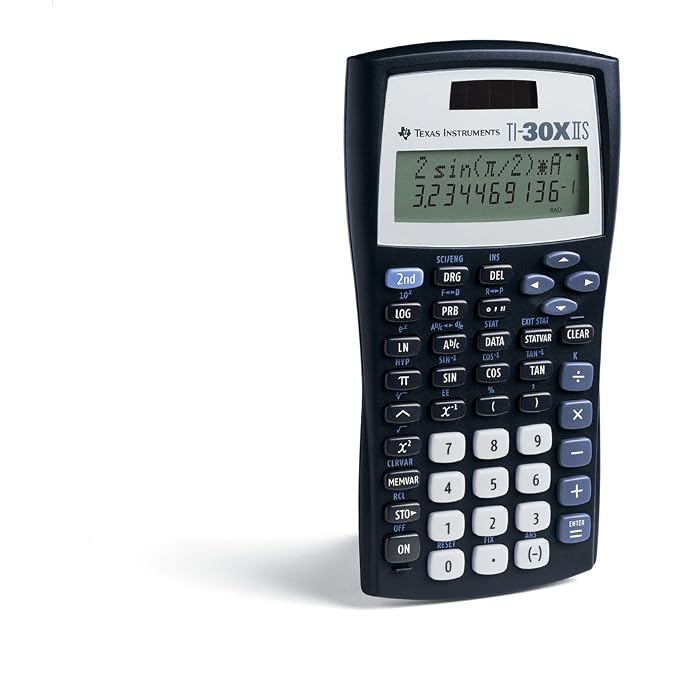
I picked up the Texas Instruments TI-30XIIS Scientific Calculator because every student needs a reliable scientific calculator for tests that ban graphing models, and this one is the classic. The two line display shows the entry and the answer together, the solar power never needs a battery change, and it handles fractions, statistics, and conversions easily. I keep reaching for Texas Instruments TI-30XIIS Scientific Calculator whenever I need it, and it has earned a permanent place in my daily routine. —Michael Thompson
I have been using the Texas Instruments TI-30XIIS Scientific Calculator for quick calculations and for exams where graphing calculators are not allowed. It is light, tough, and always ready, and the keys have a satisfying click. The memory retention keeps my values safe even when the calculator powers down. I keep reaching for Texas Instruments TI-30XIIS Scientific Calculator whenever I need it, and it has earned a permanent place in my daily routine. —Jessica Lee
What I like about the Texas Instruments TI-30XIIS Scientific Calculator is its simplicity and durability. My only complaint is that it is not a graphing calculator, so it cannot replace an Nspire for classwork, but as a backup and exam companion it is hard to beat. I keep reaching for Texas Instruments TI-30XIIS Scientific Calculator whenever I need it, and it has earned a permanent place in my daily routine. —David Martinez
Get It From Amazon Now: Check Price on Amazon & FREE Returns
Why Texas Instruments Ti Nspire Non Cas Calculator Is Necessary
I needed a graphing calculator for serious math, but the exam rules mattered as much as the features. The ACT bans CAS models, so the non-CAS CX II was the only Nspire that fit my situation.
I wanted a calculator that would last through high school and into college, not just one semester. A good graphing calculator is an investment, so the screen, the battery, and the software all had to be right.
I also wanted to understand the trade offs honestly, so I tested the CAS models too. Knowing what the CAS engine adds, and what it costs in exam eligibility, is the only way to choose with confidence.
My Buying Guides on Texas Instruments Ti Nspire Non Cas Calculator
Why I Looked for Texas Instruments Ti Nspire Non Cas Calculator
I needed a powerful graphing calculator allowed on the ACT, and the CAS version is banned there.
I set out to test the non-CAS CX II and its closest relatives for real classwork.
What I Check Before Buying
First I check the exam rules, because a CAS model is useless if your test bans it.
Then I check the screen, battery, and included software, since those decide daily comfort.
My Preference for CAS or Non-CAS
I prefer non-CAS when exams matter, because ACT and AP approval is non negotiable.
CAS wins for college engineering, where symbolic solving saves real time on hard problems.
What I Look for in Quality
I look for a bright color screen, a responsive touchpad, and a keypad that stays accurate under fast typing.
Battery life matters too, because a calculator that dies mid exam is a disaster.
How I Compare Prices
I compare the handheld plus software bundle, since a four year license adds real value.
I also weigh longevity, because a calculator that lasts four years beats a cheap one replaced twice.
My Tips for Choosing the Right One
Check your exam rules first, then your course requirements, and buy the model that satisfies both.
Spend a weekend learning the menus before the first test, so the calculator helps instead of slowing you down.
Final Thoughts
After testing these five, my honest view is that the non-CAS TI-Nspire CX II is the right choice for any student facing the ACT, while the CX II CAS is the stronger tool for college math where CAS is allowed. Buy the one your exams permit.
Check the rules, pick the model that fits, and learn it well before test day. The best calculator is the one you trust completely when the clock is running.