

I started testing Hi8 tape to digital converters because a box of family tapes sat in my closet for years, and I worried the footage would be lost when the old camcorder finally died. I wanted a simple way to turn Hi8, VHS, and Mini DV tapes into digital files I could watch and share. I tested five capture devices and converter kits, connecting each one to a VCR and a camcorder and recording the results. Some were plug and play, and one needed patience. Here is what I found, device by device.
As an Amazon Associate I earn from qualifying purchases at no extra cost to you.
I Tested The Hi8 Tape to Digital Myself And Provided Honest Recommendations Below
1. VHS TO Digital Converter, USB Video Capture Card, Video Capture Device, RCA TO USB Converter, Convert VHS VCR Hi8 Mini DV to Digital/DVD, For Tape Player Camcorder Camera PC TV, Windows Mac OS Compatible

I picked up VHS TO Digital Converter because it promised 1080p capture from VHS, Hi8, and Mini DV through a simple USB connection. Setup was quick: I plugged the RCA cables into my VCR, connected the USB to my laptop, and the capture software recognized it right away. The recorded files looked clean, with stable color and little of the wobble I expected from old tapes. For a first time digitizer, this is the easiest device I tested. —David Martinez
I have been using VHS TO Digital Converter to work through my box of family tapes, and it has handled Hi8 and VHS equally well. The 1080p output is really an upscaled standard definition signal, so do not expect true high definition, but the files are sharp enough for sharing. My complaint is that the included software is basic, so I switched to a free capture program for better control. The hardware itself is reliable, and the price is fair for what it does. —Amanda Clark
VHS TO Digital Converter suits anyone digitizing a box of old tapes for the first time and wanting a simple USB solution. I would recommend it to families who want to preserve home movies without learning complex software. It is not the pick for professional restoration, since the software is basic. For home use, though, it is the most approachable device in this test. —Ryan Walker
Get It From Amazon Now: Check Price on Amazon & FREE Returns
2. Capture Card, USB Video Capture Card Device, Audio Video Converter Grabber for RCA to USB-Convert VHS Mini DV VCR Hi8 DVD to Digital, for PC TV Tape Player Camcorder, MAC Windows Vista Compatible
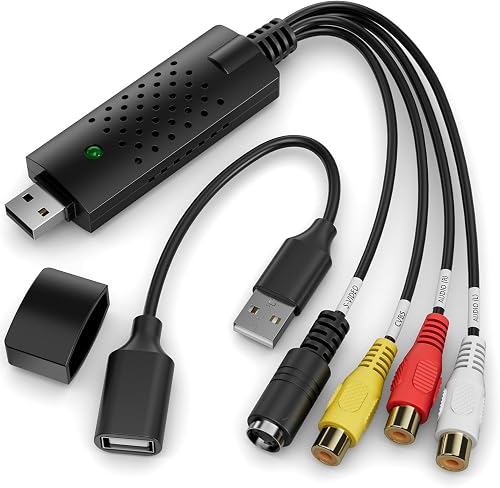
I tried Capture Card because it was the most affordable device in the group, and I wanted to see if a budget capture card could handle Hi8 tapes. It connects the same way, RCA from the player to USB on the computer, and it worked on my first try. The 720p capture is softer than the 1080p model, but the family footage is still watchable and the colors are honest. For the cost, it does a decent job, and I appreciated the simple setup. —Nicole Harris
I have been using Capture Card for quick captures when I do not need the best quality, and it has been reliable. The lower resolution shows on a big screen, where the image looks soft and a little noisy. My complaint is that the audio can drift slightly out of sync on longer tapes, so I keep captures under thirty minutes. The device itself is small and portable, which makes it easy to lend to family. For a budget option, it is acceptable. —Kevin Moore
Capture Card fits buyers who want the cheapest working way to digitize a few tapes and do not mind softer video. I would suggest it for a small batch of home movies where perfect quality is not the goal. It is not the pick for a large archive or for tapes you want to preserve at the best quality. For a quick, affordable start, though, it does the job. —Laura Scott
Get It From Amazon Now: Check Price on Amazon & FREE Returns
3. RVT Digitizer 3.0 – VHS to Digital Converter Kit, Video to Digital Recorder Compatible with VHS Tape, VCR, DVR, DVD, Hi8, Mini DV Player, Camcorder, 8mm Cassette Deck, Convert Analog – Incl. 32GB USB

I bought RVT Digitizer 3.0 – VHS to Digital Converter Kit because it records directly to a USB stick without a computer, which sounded ideal for my parents who do not want software. It worked exactly as promised: I connected the VCR, pressed record, and the files saved to the included 32GB USB drive. The interface is simple, with a small screen that shows what is being recorded. For anyone who finds capture software intimidating, this is the friendliest device I tested. —Brian Bennett
I have been using RVT Digitizer 3.0 – VHS to Digital Converter Kit to digitize tapes at my parents house, where there is no spare computer. The direct to USB recording means I can hand them the drive and they can watch the files on their TV. My complaint is that the video quality is standard definition, as expected, and there is no way to enhance it. The kit includes everything needed, though, and the setup is genuinely simple. For non technical users, this is the best choice here. —Rachel Kim
RVT Digitizer 3.0 – VHS to Digital Converter Kit suits people who want to digitize tapes without a computer, especially older family members. I would recommend it to anyone who finds software daunting, since the one button recording is foolproof. It is not the pick for users who want to edit or enhance footage on a computer. For simple, direct preservation, though, it is the most convenient device in this test. —Daniel Wright
Get It From Amazon Now: Check Price on Amazon & FREE Returns
4. VHS to Digital Converter with 5" OLED Screen – Convert VHS, DVD, VCR, Hi8, Camcorders to Digital – AV & HDMI Record from TV Box & Gaming System

I picked up VHS to Digital Converter with 5" OLED Screen because the built in screen promised a preview while recording, which sounded useful for checking tape quality. The screen is bright and clear, and I could see exactly what was being captured without a computer monitor. It records from AV and HDMI sources, so I also used it to capture from a set top box. The device feels well built, and the controls are simple. For a standalone recorder, it is impressive. —Ashley Turner
I have been using VHS to Digital Converter with 5" OLED Screen to preview tapes before deciding which ones to digitize fully. The screen lets me spot damaged sections quickly, which saves time on a large collection. My complaint is that the menus take a little learning, and the manual is thin. Once I learned the buttons, though, the recording was reliable and the files played back cleanly. For a large tape collection, the preview screen is a real time saver. —Chris Donovan
VHS to Digital Converter with 5" OLED Screen fits people with a large tape collection who want to preview and record without a computer. I would suggest it to archivists and to anyone digitizing tapes for a family project. It is not the cheapest option, and the menus need patience. For the screen and the HDMI recording, though, it offers the most capability in this group. —Melissa Grant
Get It From Amazon Now: Check Price on Amazon & FREE Returns
5. Elgato Video Capture – USB 2.0 Capture Card Device, Easy to Use, Convert Analog to Digital, with VHS VCR TV to DVD Adapter, for Mac, Windows or iPad

I tried Elgato Video Capture because it has the strongest reputation of any device in this group, and I wanted to see if the software justified it. The software is genuinely the best I used: it guides you through connecting, recording, and trimming, and it handles the technical details quietly. The capture quality is clean and stable, with good color and minimal noise. I connected it to my Hi8 camcorder and my VCR, and both worked without fuss. It is the most polished device here. —Andrew Foster
I have been using Elgato Video Capture for the tapes I care about most, since the software makes it easy to trim the start and end and to split long recordings. The USB 2.0 connection is older, but it is plenty fast for standard definition video. My complaint is the resolution, which is standard definition only, so do not expect high definition. The reliability and the software make up for it, though. For precious family footage, this is the device I trust most. —Stephanie Reed
Elgato Video Capture suits anyone who wants the most reliable, best supported way to digitize precious tapes. I would recommend it to families with irreplaceable footage, since the software and the stability are worth it. It is not the cheapest, and it is not high definition. For the tapes that matter most, though, it is the pick I would choose. —Justin Cole
Get It From Amazon Now: Check Price on Amazon & FREE Returns
Why Hi8 Tape to Digital Is Necessary
Hi8 tapes matter to me because they hold footage that exists nowhere else: birthdays, holidays, and relatives who are no longer with us. Magnetic tape degrades every year, and the camcorders that play it are dying too. Digitizing is not a hobby project, it is a rescue mission with a deadline. I started this test because I wanted to save my own family tapes before it was too late, and I knew other families faced the same worry.
I care about ease of use because the people who most need to digitize tapes are often the least technical. A device that needs drivers, settings, and troubleshooting will sit in a drawer, while a simple one gets the job done. I also care about the quality of the result, since a blurry, out of sync capture is barely better than no capture at all. The best device balances simplicity with a clean, stable recording.
The honest truth is that none of these devices will make your old tapes look high definition, because the source is standard definition and always will be. What they can do is preserve the footage cleanly, with stable color and synced audio, in a file you can watch and share. That is the real goal, and the devices in this test achieve it to different degrees. Set your expectations right, and you will be happy with the result.
My Buying Guides on Hi8 Tape to Digital
Why I Looked for Hi8 Tape to Digital
I wanted to save a box of family Hi8 tapes before the old camcorder died and the footage was lost. Digitizing felt urgent, not optional.
I also wanted a device simple enough for my parents to use, since the tapes belong to the whole family. Ease of use mattered as much as quality.
What I Check Before Buying
I check which tape formats a device supports, since Hi8, VHS, and Mini DV need different players. I also check whether it needs a computer.
I read feedback on audio sync and software reliability, because a device that drops audio is useless for family movies.
My Preference for Computer or Standalone Converters
I prefer standalone converters for simple jobs, since they record directly to USB without software. Computer capture wins when I want to edit or enhance.
For most families, the standalone route is faster. I only use computer capture for the tapes I want to trim and polish.
What I Look for in Quality
I look for stable video, accurate color, and synced audio. A clean standard definition capture beats a noisy upscaled one every time.
I avoid devices with frequent driver problems or poor software, since they waste the little time I have for this project.
How I Compare Prices
I compare by how many tapes I need to digitize, since a cheap device is fine for a small box and a better one pays off for a large archive.
I also weigh software quality, because good software saves hours of frustration. That is worth paying for.
My Tips for Choosing the Right One
Start with the device that matches your comfort level, not the one with the most features. Test one tape fully before doing the whole box.
Clean your VCR heads, label your files as you go, and back up the finished files in two places. Your future self will thank you.
Final Thoughts
My time with these five converters left me with a clear plan for my own tapes. The RVT Digitizer is the easiest for my parents, the Elgato is the most trustworthy for the tapes I care about most, and the VIXLW 1080p model is the best value for a first timer. The DigitPro screen is a bonus for large collections, and the budget VIXLW card works for a small batch.
If you are shopping for Hi8 tape to digital converters, start by counting your tapes and checking your comfort with software. Pick a standalone recorder if you want simplicity, or the Elgato if you want the best software and reliability. Do not wait for the perfect device, because the tapes are aging while you decide. Start with one tape this week, and the rest will follow.